I Was "Monitoring" 25+ Instagram Pages. I Was Just Wasting Time.
Thirty minutes every morning checking the same pages. Turns out I wasn't monitoring anything. So I built something that does it instead.
Every morning, the routine was the same.
Open Instagram. Check page one. Stories posted? Good. Check page two. Stories? Yes. Check page three…
Twenty-five pages later, thirty minutes had passed. And I hadn’t done anything useful. I’d just confirmed that things existed.
That’s not monitoring. That’s just time disappearing.
The problem I didn’t know I had
When you’re managing 25+ pages, there’s an issue that doesn’t show up anywhere: it’s not whether you post stories. It’s when.
Stories posted too close together don’t spread the way they should. The algorithm sees a burst, not a cadence. Reach drops. Views thin out. And because you can’t manually track gaps across that many pages, it just keeps happening quietly.
We were posting stories two minutes apart on some pages. Sometimes one minute. We had no idea.
So I built StoryDash — an Instagram story monitoring dashboard
One screen. Every page, every story posted today, when each was last active, whether the spacing is clean. No app open.
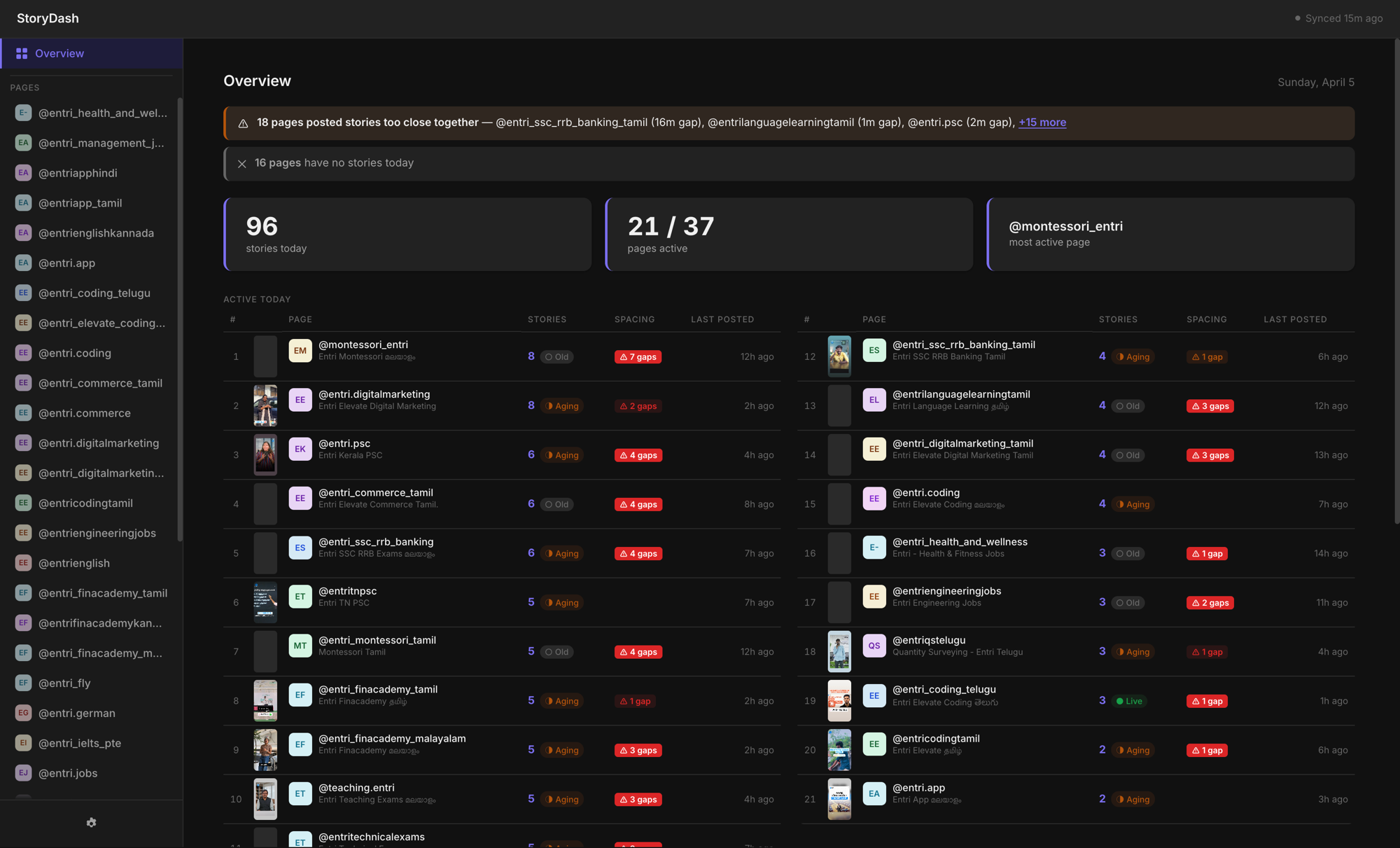
37 pages. 96 stories today. 21 pages active. The ones with nothing posted and the ones breaking spacing rules, right there, without opening Instagram once.
Catching Instagram story spacing violations automatically
When I added the spacing check, I expected maybe two or three pages with issues.
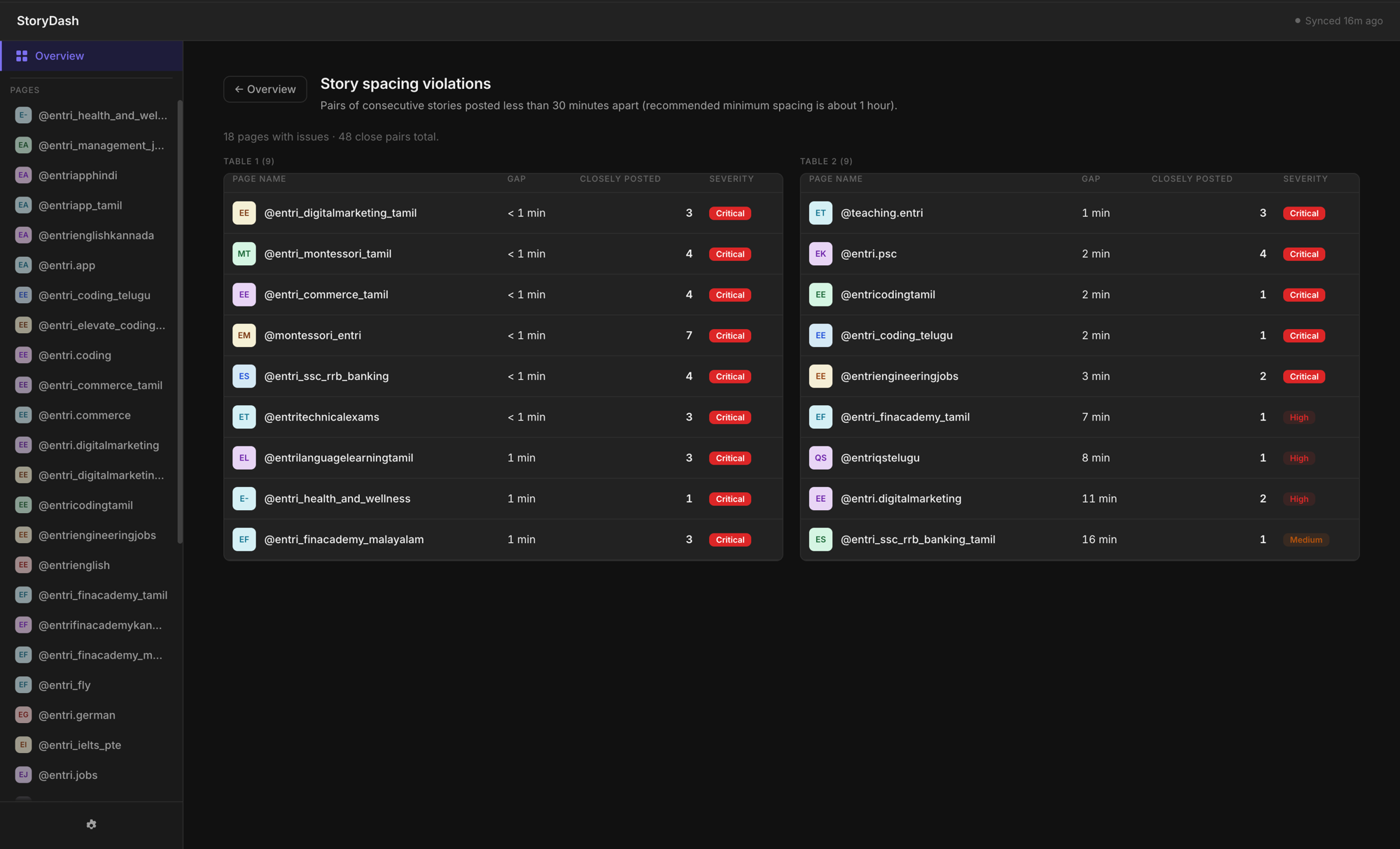
It was more than that. Multiple pages posting consecutive stories less than a minute apart. Some flagged critical. This had been happening every single day and we’d never caught it.
I showed this to the team. Nobody spoke for a second.
Per-page Instagram story analytics: timestamps, thumbnails, and spacing
Click any page, see the full day: thumbnails, timestamps, exactly where the gaps are too short.
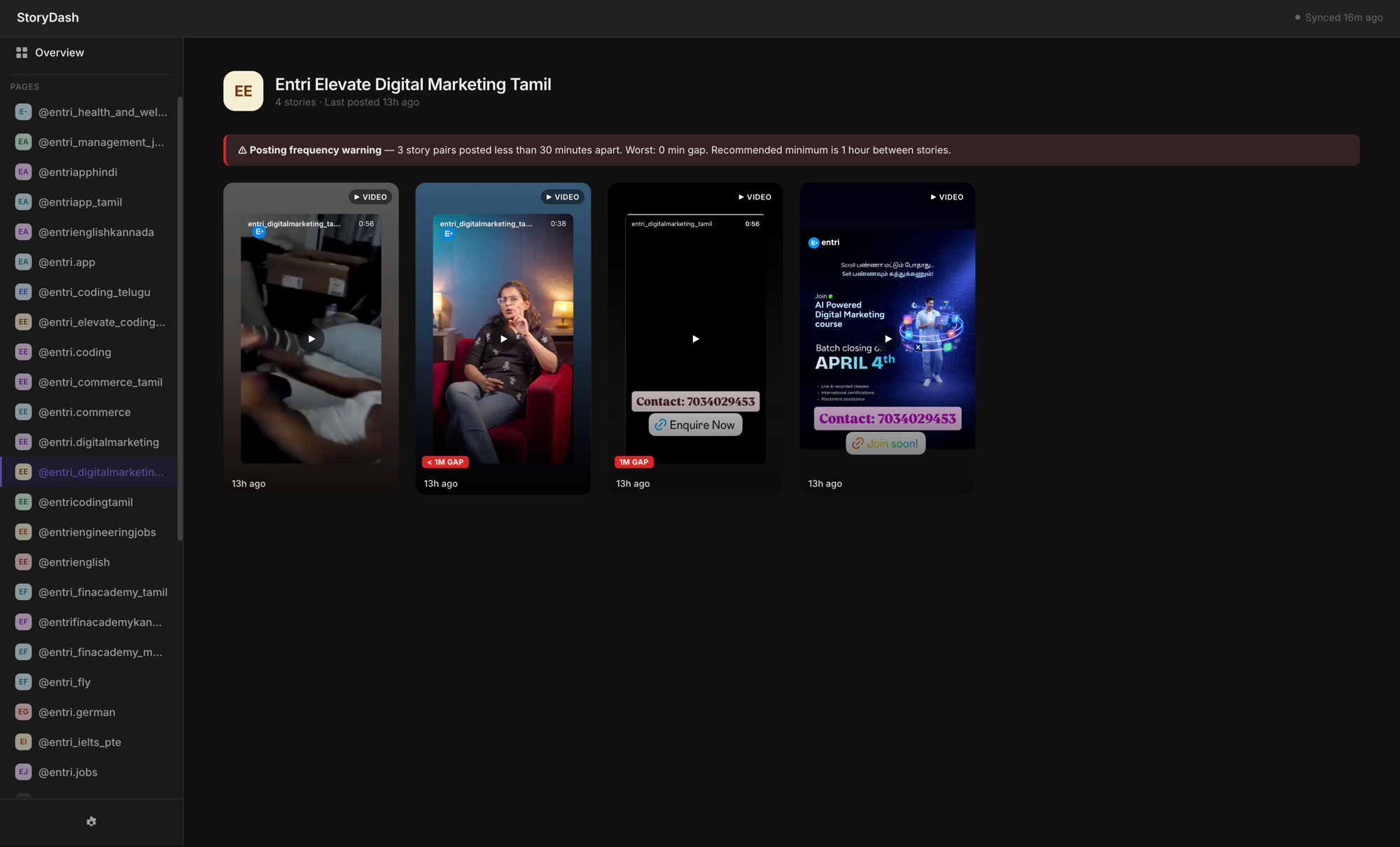
Three pairs of stories posted under 30 minutes apart. Worst gap: 0 minutes. The dashboard shows the exact violation and the recommended minimum, so the person managing that page knows what to fix, not just that something’s wrong.
The email that arrives without anyone asking
The dashboard solved the need to check. But I wanted to remove the need to check the dashboard too.
Hourly automated email. Every hour: pages that posted, pages that haven’t, which ones need attention.
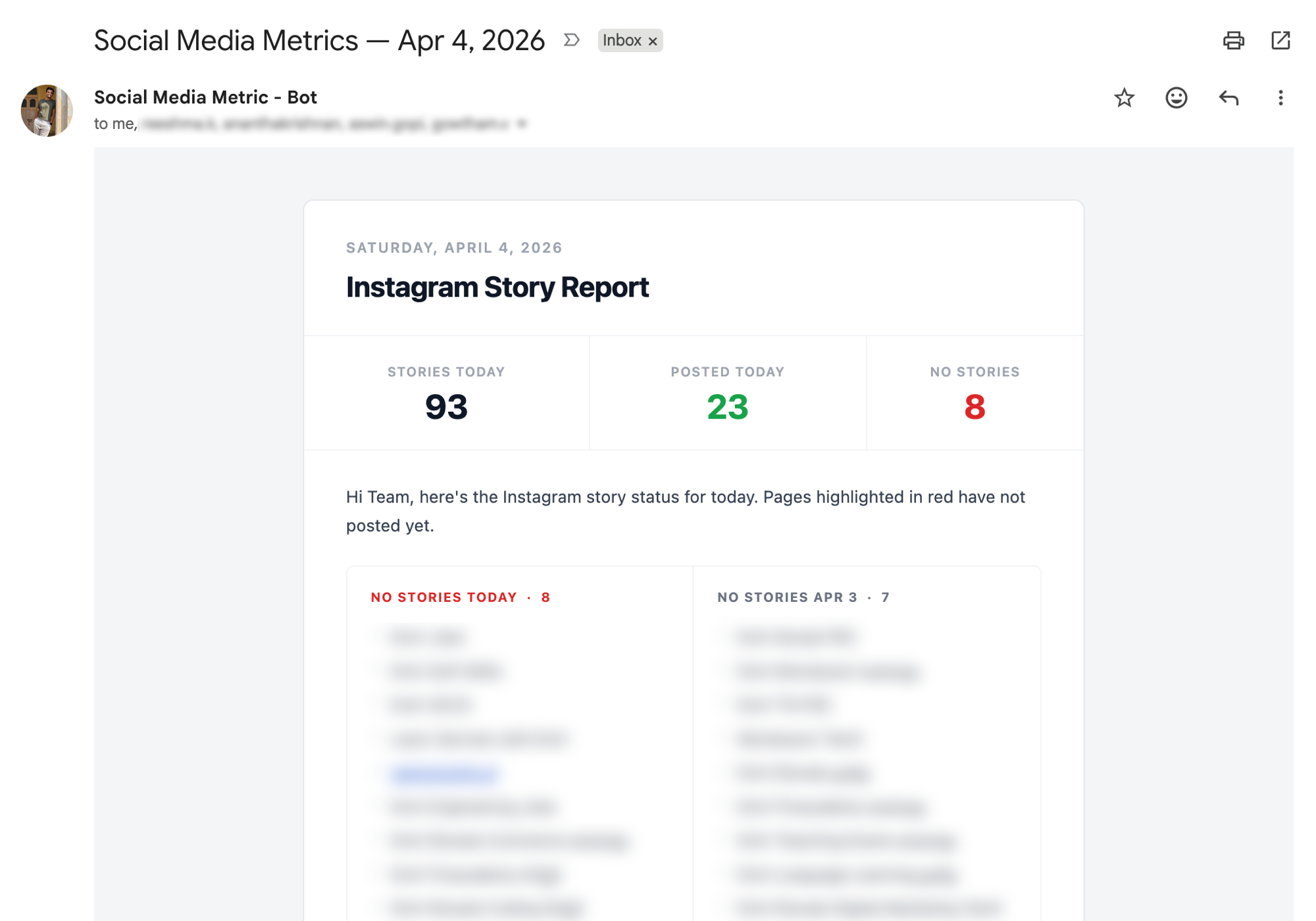
93 stories tracked. 23 pages posted. 8 with nothing yet, highlighted.
The information arrives. No one has to open anything.
How it got built
Claude Code. Dashboard, spacing logic, automated emails. All of it.
Describe the problem. See what gets built. Describe what’s wrong or missing. Iterate. No ticket raised. No engineer looped in. No technical spec written.
I started with the core problem: I need to see story activity across all pages in one view. Claude Code built the dashboard. Then spacing detection: flag anything under 30 minutes between consecutive stories. It added the logic and the violations view. Then the email report: send this data hourly, formatted cleanly. Done.
Three features. One clear problem statement each time. The whole thing went from idea to running in production without once opening a code editor.
I manage content operations. Building tools is not a skill I have. That’s the point.
Running in production. Full project overview: StoryDash →
Same approach on different problems — automated the daily OKR lead report that replaced our morning meeting math, and built Chrome extensions to pull data from dashboards that have no export.
What you need to build an Instagram story monitoring tool
The data comes from the Instagram Graph API. Timestamps, media objects, which page posted what and when. You need a Facebook developer account, an approved app, and Instagram Business accounts for each page you’re monitoring. Personal accounts have no API access.
Most teams don’t have this running. Not because it’s hard. It just needs someone to set it up once, and that request never beats actual product work. With Claude Code, I didn’t need to wait on anyone.
How to monitor multiple Instagram accounts at scale
One data source pulling from all pages. One screen where everything is visible at once, not the app, not separate tabs. Something that catches spacing violations before you find out from a reach drop. Reports that arrive without anyone requesting them.
Miss any one of those and someone’s still doing something by hand every day. That’s how you know it’s not finished.
More on this: Automate a Daily Lead Performance Report · Build Chrome Extensions Without Coding · What Vibe Coding Means for Non-Developers
Common questions
Does posting Instagram stories too close together hurt reach? Yes, and it’s quiet about it. Stories posted too close together get treated as a burst by the algorithm — not a cadence. Reach drops, views thin out, and you don’t get a notification. The safe window is 30 to 60 minutes between posts. Under that, you’re losing distribution every single day without knowing it.
How do you monitor Instagram story activity across multiple pages without opening the app? Pull story data from the Instagram Graph API into a single dashboard — post times, gaps, which pages have posted and which haven’t, all in one view. Add automated email reports on a schedule. The information should arrive without anyone opening anything. That’s what monitoring actually means.
Can you build internal social media tools without a developer? Yes. Describe the problem clearly enough and Claude Code builds it. StoryDash started as a plain description of what I needed to see — dashboard, spacing logic, hourly emails. No ticket raised. No spec written. Just described what was broken and iterated until it worked.
What is the best tool to manage multiple Instagram pages at once? Generic tools focus on scheduling. The gap is monitoring — knowing which pages have posted today, which haven’t, whether story spacing is safe. Nothing off-the-shelf does this well at 25+ pages. Build it yourself and it does exactly what your operation needs, nothing else.
How do you track Instagram stories across multiple accounts? Instagram Graph API pulls story data — timestamps, media objects, activity per page — into one view. All accounts, one screen, no app. Pair it with scheduled email reports and the team knows the status without opening a dashboard.
What is Instagram story spacing and why does it matter? Story spacing is the time between consecutive stories on one page. Under 30 minutes and the algorithm reads it as a burst, not a cadence. Distribution drops. Each story gets fewer views than it should. At scale — 25 pages — this is happening every day, silently. You only catch it if something is tracking it.
How do you manage Instagram content operations at scale? Replace the manual checks with systems that surface information automatically. A monitoring dashboard for story activity. Automated flags for spacing violations. Scheduled reports that arrive without anyone asking for them. The goal is for the team to always know what’s happening without having to go looking for it.